Meta Ads specs decide whether your creative looks native on every screen or gets cropped, letterboxed and buried under interface buttons. Heading into 2027, getting them right matters more than ever. Since August 2026, Meta has removed most ad-set placement exclusions, so your creative, not your settings, now decides how an ad performs in each placement.
This guide covers the current sizes, safe zones, text limits and format rules. It ends with 12 placement best practices you can apply before your next launch.
Key Takeaways
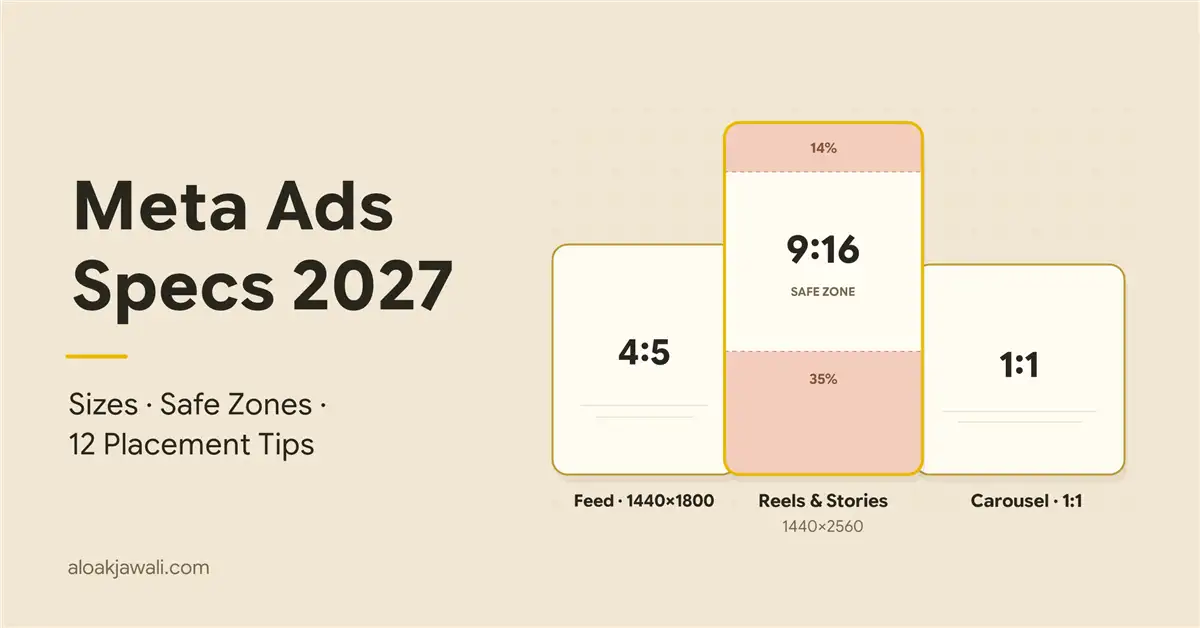
- Three master files cover almost every placement: 4:5 (1440×1800) for Feed, 9:16 (1440×2560) for Stories and Reels, and 1:1 for carousel, Marketplace and search.
- Design every 9:16 asset to the Reels safe zone: keep the top 14%, bottom 35% and 6% of each side clear. That clears Stories too.
- Lead with your message in the first 40 characters, because Reels and Facebook Feed headlines truncate far earlier than the 125/40 guideline suggests.
- Since August 2026, most ad sets use value rules instead of placement exclusions. These Meta Ads specs and creative choices are now your main placement controls.
What Are Meta Ads Specs?
Meta Ads specs are the technical requirements for ads on Facebook, Instagram, Threads, Messenger, WhatsApp and Audience Network. They cover aspect ratio, resolution, file type and size, video length, text length and safe zones for each placement and format.
The official source for Meta Ads specs is Meta’s Ads Guide. Treat it as a living document. Meta’s own pages sometimes disagree: for Facebook Feed carousels, the Help Center recommends 125 characters of primary text, a 40-character headline and a 25-character description, while the Ads Guide lists 80, 20 and 18. When the two conflict, use the shorter number.
Meta Ads Specs at a Glance: 3 Files Cover Almost Every Placement
You don’t need a different file for every placement. These three masters cover nearly everything:
| Master file | Ratio | Recommended size | Use it for |
|---|---|---|---|
| Vertical feed | 4:5 | 1440 × 1800 px | Facebook and Instagram Feed |
| Full-screen | 9:16 | 1440 × 2560 px | Stories and Reels on both apps |
| Square | 1:1 | 1440 × 1440 px (min. 1080 × 1080) | Carousel, Marketplace, search, right column |
The core technical Meta Ads specs from the Ads Guide:
- File size: Images can be up to 30 MB; videos up to 4 GB.
- Minimum width: 600 px for Facebook Feed (750 px tall) and 500 px for Instagram placements.
- Ratio tolerance: Meta allows a 3% ratio tolerance in Facebook Feed but only 1% on Instagram and in Stories. Export at exact ratios rather than relying on it.
Want these numbers handy while you build creative? Use this Free companion resource.
Meta Ads Specs by Placement
The tables below show supported ratios and maximum video lengths by placement. These are limits, not targets. Shorter, hook-first edits almost always perform better on mobile.
| Placement | Best ratio | Supported ratios | Max video length |
|---|---|---|---|
| Facebook Feed | 4:5 | 1.91:1, 16:9, 1:1, 4:5 | 1 second to 241 minutes |
| Instagram Feed | 4:5 (image), 9:16 (video) | 4:5 to 1.91:1, plus 2:3 | 1 second to 60 minutes |
| Facebook Stories | 9:16 | 1.91:1 through 9:16 | 1 to 120 seconds |
| Instagram Stories | 9:16 | 1.91:1 through 9:16 | 1 second to 60 minutes |
| Instagram Reels | 9:16 | 1.91:1 through 9:16, incl. 2:3 | Up to 15 minutes |
| Facebook Reels | 9:16 | 1.91:1 through 9:16, incl. 2:3 | No maximum listed |
| Marketplace, search, right column | 1:1 | 1:1 | Varies by placement |
Threads feed:
- Formats: single image, single video and image carousels, in 1:1 or 4:5.
- Placement rule: You can’t run Threads ads alone; Instagram Feed must also be selected.
- Catalog ads: Advantage+ catalog ads on Threads support image and image carousel formats, but not video yet.
WhatsApp Status: Ads in WhatsApp Status are available through Meta’s Marketing API. Check Ads Manager for availability in your account.
Safe Zones: The Meta Ads Specs Most Creatives Break
Safe zones are the Meta Ads specs that cause the most visible mistakes. Profile names, captions, CTA buttons and engagement icons sit on top of 9:16 ads, and anything placed underneath them is hidden.
The rule: Meta’s Ads Guide asks you to keep the top 14%, the bottom 35% and 6% of each side free of text, logos and other key elements. Reels ads with disclaimers need the bottom 40% clear.
| Margin | 1080 × 1920 | 1440 × 2560 |
|---|---|---|
| Top (14%) | ≈ 269 px | ≈ 358 px |
| Bottom (35%) | ≈ 672 px | ≈ 896 px |
| Bottom with disclaimer (40%) | 768 px | 1,024 px |
| Each side (6%) | ≈ 65 px | ≈ 86 px |
Meta’s Stories guidance is lighter, at roughly 14% top and 20% bottom so the call-to-action sticker doesn’t cover your text. Even so, design every 9:16 asset to the stricter Reels margins. One file then works in both placements.
Meta Ad Formats and How Specs Change by Format
Meta supports several formats: single image, single video, carousel, collection, Instant Experience, and flexible Advantage+ creative, where you supply multiple assets and Meta assembles them per placement. Each format inherits the placement-level Meta Ads specs above, plus its own rules:
- Carousel: 2 to 10 cards, usually 1:1 at 1080 × 1080. Every card must share the same ratio, or Meta defaults to the first card’s ratio and crops the rest. Meta’s developer documentation recommends at least 3 cards.
- Single video: Use 4:5 for Feed and 9:16 for Stories and Reels, with at least 1080 px on the short side.
- Collection and Instant Experience: A cover image or video plus a product grid that opens a full-screen experience. Use your 1:1 or 4:5 master as the cover.
Text and Character Limits in Meta Ads Specs
Meta recommends 125 characters of primary text, 40 for the headline and 25 for the description on most placements, and warns that longer text may be truncated. Real placements show far less:
| Placement | Visible primary text | Visible headline |
|---|---|---|
| Most placements (guideline) | 125 | 40 |
| Facebook Feed image ads | 50–150 | 27 |
| Facebook Reels | ~40 | 55 |
| Instagram Reels | ~44 | — |
| Facebook Reels overlay ad | — | 10 |
The practical rule: put the offer or hook in the first 40 characters of primary text. Keep headlines under 27 characters if Facebook Feed matters to you.
Meta Ad Placements in 2026: What Changed
The biggest 2026 change isn’t in the Meta Ads specs themselves. It’s in how much control you have over where ads run.
- Ad-set exclusions removed: From August 25, 2026, advertisers began reporting that the placement control had disappeared from Ads Manager, replaced by value rules. Value rules adjust bids from +1,000% down to −90%, so a placement can be made expensive to win but never impossible.
- The trend behind it: On February 18, 2026, the unified Advantage+ structure banned campaign-level placement exclusions. On July 29, 2026, Marketing API version 26.0 removed Instagram Explore Feed and Messenger Stories as selectable placements.
- Who still has controls: Awareness and traffic campaigns keep the old ad-set controls for now. Leads, Sales, Engagement and App promotion campaigns have lost them.
- Hard blocks still exist: Account-level placement restrictions remain under Advertising Settings, separate from ad-set controls.
- Threads is on by default: The Threads feed placement is switched on by default for new campaigns using either Advantage+ or manual placements.
12 Proven Placement Best Practices
With fewer placement switches, creative that fits each surface is your main lever. These 12 practices turn the Meta Ads specs above into an operating checklist.
- Build three masters per concept: a 4:5, a 9:16 and a 1:1, exported at 1440 px wide where possible. Never let Meta auto-crop a single landscape file.
- Design all 9:16 assets to the Reels safe zone (14% top / 35% bottom / 6% sides). Use 40% at the bottom if you need a disclaimer.
- Customize assets per placement in Ads Manager so Reels gets your 9:16 cut and Feed gets your 4:5 cut. Don’t rely on automatic adjustments.
- Export exact ratios. Instagram and Stories allow only 1% tolerance, so a “nearly 4:5” file gets reformatted.
- Hook in the first three seconds. Show the product or the payoff immediately, and add captions so the message works with sound off. If you optimize for ThruPlays, note that Meta now offers a 6-second ThruPlay option for Awareness and Engagement campaigns, suited to Reels and Stories.
- Write for 40 visible characters. Lead the primary text with the offer, keep Facebook Feed headlines at 27 characters or fewer, and treat the description as optional.
- Keep carousel cards identical in ratio and use at least 3 cards. Order them so card one works on its own.
- Start with Advantage+ placements, then read the placement breakdown before making changes. Threads delivery is included by default, so check it separately.
- Replace exclusions with data-backed value rules. You can set up to 10 rules per ad set; base each one on placement-level cost per purchase or lead quality, not hunches.
- Use account-level placement controls for hard brand-safety blocks, because value rules can only discount a placement, not remove it.
- Don’t default to 1.91:1 landscape. It’s supported in most placements but uses far less mobile screen than 4:5 or 9:16.
- Re-check the Ads Guide before major launches. Placements were removed and controls changed several times in 2026 alone.
How to Measure Whether Your Specs Are Working
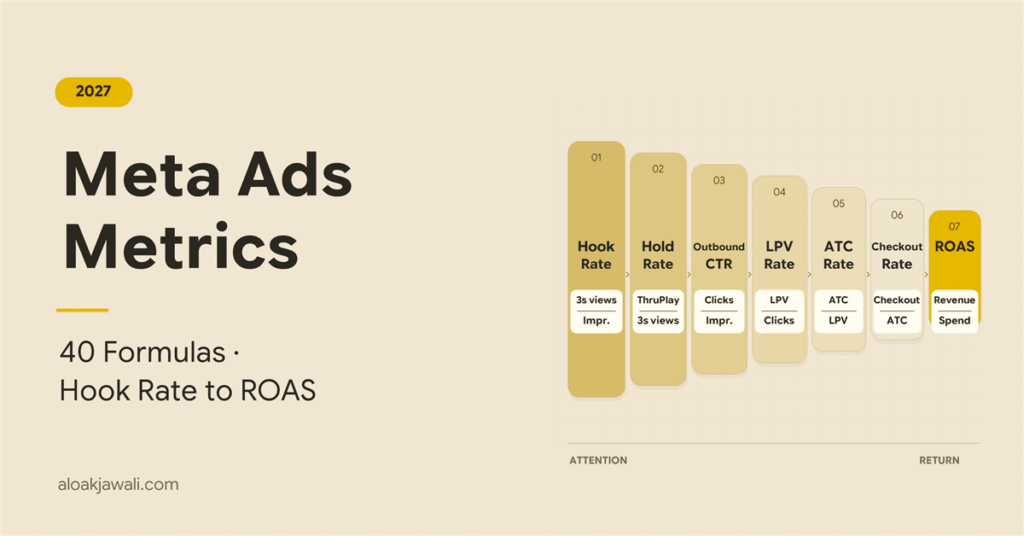
Correct Meta Ads specs only prove their value in placement-level results. In Ads Manager, break down performance by placement and compare Hook Rate, Hold Rate, outbound CTR and cost per purchase for your 9:16, 4:5 and 1:1 cuts. A Reels ad with a strong Hook Rate but weak CTR often means the CTA sits inside the bottom 35% and is hidden by the interface.
For the formulas and a full diagnostic table, see my guide to Meta Ads metrics and formulas.
Frequently Asked Questions
What are the Meta Ads specs for Reels in 2026?
The Meta Ads specs for Reels are 9:16 at 1440 × 2560 px (1080 × 1920 also works). Images can be up to 30 MB and videos up to 4 GB. Keep the top 14%, bottom 35% and 6% of each side clear, or the bottom 40% if you have a disclaimer.
What size should Facebook and Instagram feed ads be?
Use 4:5 at 1440 × 1800 px. It takes up more mobile screen than 1:1 and works in both Facebook and Instagram Feed.
Can I still exclude placements in Meta Ads?
Not at the ad-set level for most objectives. Since August 2026, you use value rules, which can lower a placement’s bid by up to 90%, plus account-level placement controls for hard blocks.
Do Threads ads need separate creative?
No. Threads supports single image, single video and image carousels in 1:1 or 4:5, so your Feed masters work. Instagram Feed must be selected alongside Threads.
How often do Meta Ads specs change?
Meta Ads specs and placements change several times a year. In 2026 alone, Meta updated safe-zone guidance, removed Explore Feed and Messenger Stories placements, and replaced ad-set exclusions with value rules. Check the Ads Guide before each major launch.
Conclusion
Meta Ads specs used to be a design detail. In 2027, they are one of the few placement levers you still control. Build three masters, design 9:16 to the Reels safe zone, write for 40 visible characters, and replace old exclusions with value rules backed by placement data. Do that, and every placement Meta chooses for you shows your ad the way you designed it.
Need help auditing your Meta creative and placements? Visit Aloak Jawali, digital marketing consultant, or grab the Free resource to keep these specs on hand.
Sources: Meta Ads Guide; Meta for Developers. All retrieved November 22, 2026.