For three decades, robots.txt was a conversation with a handful of search engines. You let Googlebot and Bingbot in, they ranked your pages, and visitors came back through the results. Today your server logs show a second crowd, with names like GPTBot, ClaudeBot, and PerplexityBot. Understanding search engine bots vs. LLM bots is now basic technical SEO. The fastest way to see how your file treats each one is to test it in our free robots.txt validator.
LLM bots don’t all want the same thing:
- Some collect training data.
- Some build an index for AI search answers.
- Some fetch a single page because a person asked a question a few seconds ago.
Each job has its own user-agent token, which is good news. It means robots.txt lets you say yes to one and no to another. If you’re new to the file itself, start with our guide to how a robots.txt file works with search engine crawlers.
Key Takeaways
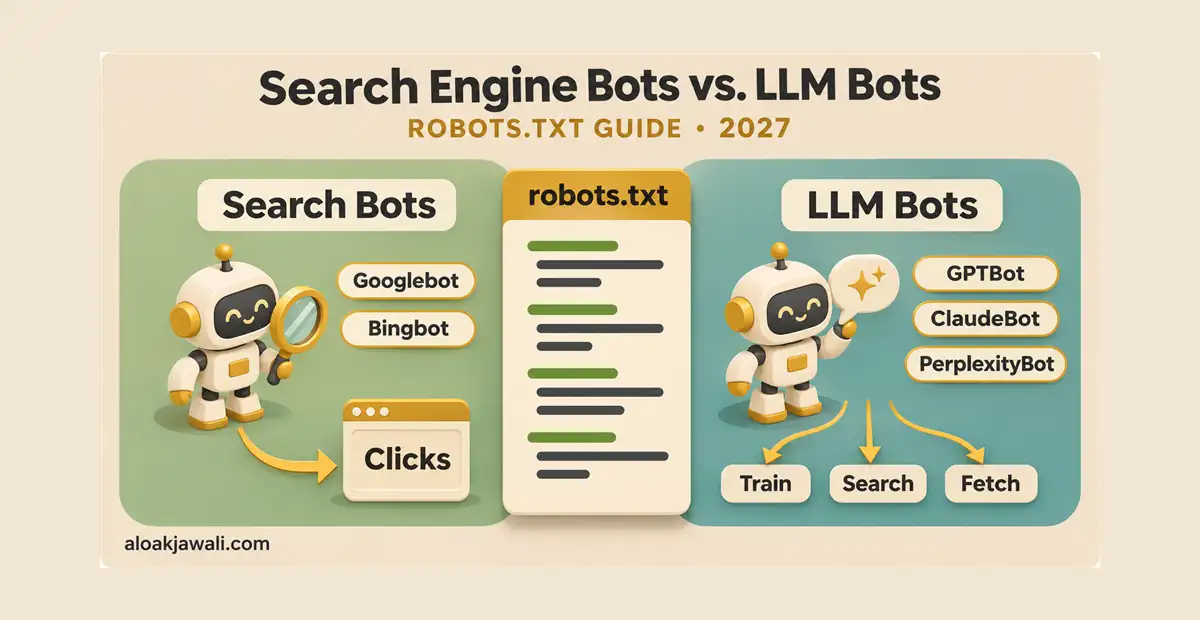
- Search engine bots crawl to rank pages and send clicks back. LLM bots crawl for training, for AI search, or to fetch a page on a user’s request.
- OpenAI, Anthropic, and Perplexity split these jobs across separate bots, so you can block training and still appear in AI search answers.
- User-initiated fetchers like ChatGPT-User and Perplexity-User may not follow robots.txt, because a person started the request.
- Google-Extended controls Gemini training and grounding, not AI Overviews. To leave AI Overviews and AI Mode, use the Search generative AI control in Search Console.
- Once you name a bot in its own group, it stops reading your
User-agent: *rules. Repeat any shared rules inside that group.
What’s the Difference Between Search Engine Bots and LLM Bots?
The difference comes down to what happens after the crawl.
| Search engine bots | LLM bots | |
|---|---|---|
| Main purpose | Index pages and rank them in search results | Train models, power AI search, or answer a live user request |
| What you get back | Clicks from search results | Citations and some clicks (search and fetch bots); nothing direct (training bots) |
| Examples | Googlebot, Bingbot, DuckDuckBot, Applebot | GPTBot, OAI-SearchBot, ChatGPT-User, ClaudeBot, PerplexityBot, CCBot |
| Robots.txt control | Reliable | Reliable for crawlers; inconsistent for user-initiated fetchers |
A search engine bot fetches your page, adds it to an index, and shows a link to it when someone searches. The exchange is direct: you allow crawling and get visitors in return.
An LLM bot fetches your page for one of three jobs:
- Training. The page may become part of a dataset used to build future models. There’s no link and no visit.
- AI search indexing. The page goes into an index that an AI assistant searches when it answers a question, usually with a cited link.
- User-initiated fetching. A person asks a chatbot about a URL or topic, and the assistant reads the page live to answer.
Jobs 2 and 3 can send you traffic, while job 1 almost never does. That’s why a blanket “block all AI” rule often costs more than people expect. It’s also why a blanket “allow everything” rule may give away more than they intend.
Traditional Search Engine Bots
These are the crawlers most sites have allowed for years:
| Bot | Search engine | Robots.txt token | What blocking it does |
|---|---|---|---|
| Googlebot | Google Search, Images, News, Discover | Googlebot |
Removes you from Google Search, including AI Overviews |
| Bingbot | Bing, plus products built on its index | bingbot |
Cuts visibility in Bing and partner engines |
| DuckDuckBot | DuckDuckGo | DuckDuckBot |
Stops DuckDuckGo’s own crawling |
| Applebot | Siri, Spotlight, Safari suggestions | Applebot |
Removes you from Apple’s search features |
Bingbot reaches further than its market share suggests. Yahoo runs on Bing’s index, DuckDuckGo draws on it, and Microsoft Copilot grounds its answers in it. One bingbot rule therefore affects several products at once.
In practice, Bingbot already does LLM work, because AI assistants cite pages it crawled. Microsoft is responding with separate training and grounding preferences, which it will start honoring on February 1, 2027.
LLM Bots by Company
This is where the tokens multiply. Here are the bots most sites need to know:
| Company | Token | Job | Follows robots.txt? |
|---|---|---|---|
| OpenAI | GPTBot | Model training | Yes |
| OpenAI | OAI-SearchBot | ChatGPT search index | Yes |
| OpenAI | ChatGPT-User | Live fetch on user request | May not apply |
| Anthropic | ClaudeBot | Model training | Yes |
| Anthropic | Claude-SearchBot | Claude search index | Yes |
| Anthropic | Claude-User | Live fetch on user request | Yes |
| Perplexity | PerplexityBot | Perplexity search index | Yes |
| Perplexity | Perplexity-User | Live fetch on user request | Generally no |
| Google-Extended | Control token for Gemini training and grounding | Not a crawler | |
| Apple | Applebot-Extended | Control token for Apple AI training | Not a crawler |
| Common Crawl | CCBot | Open web dataset widely used for AI training | Yes |
Here’s what each company’s documentation says.
OpenAI treats its tokens as independent settings. You can allow OAI-SearchBot so you appear in ChatGPT search while disallowing GPTBot from training.
- Opting out of OAI-SearchBot keeps you out of ChatGPT search answers, though your site can still appear as a navigational link.
- For ChatGPT-User, OpenAI now says robots.txt rules may not apply, because a person initiates the action. That wording arrived in a December 9, 2025 documentation update, which removed earlier language applying the rules to all three agents.
- Expect a lag: search results take about 24 hours to reflect a robots.txt change.
Anthropic runs three bots. It says all of them respect robots.txt and won’t try to bypass CAPTCHAs.
- Blocking ClaudeBot signals that your future content should be left out of training datasets.
- Blocking Claude-SearchBot stops indexing for Claude’s search results.
- Blocking Claude-User stops Claude from retrieving your pages when a user asks.
- Anthropic also supports Crawl-delay if you’d rather slow its bots than block them.
Perplexity splits discovery from retrieval. PerplexityBot builds the search index and follows robots.txt. Perplexity-User fetches pages for a person’s question and, according to Perplexity, generally ignores robots.txt.
Google and Apple don’t run separate crawlers for AI training. Google-Extended and Applebot-Extended are control tokens: their regular crawlers fetch the pages, and the token decides how the content may be used afterward. Apple has also confirmed that Applebot-Extended rules don’t affect Apple Search ranking.
Common Crawl’s CCBot builds a free, open web archive. Many AI companies have trained on it, so blocking CCBot is a common way to limit indirect training use.
The Traffic Trade: What Each Bot Gives Back
Cloudflare measures this exchange with a crawl-to-refer ratio: the number of pages crawled for every visitor sent back. TechnologyChecker analyzed Cloudflare Radar data for the third quarter of 2026 (July through September):
| Operator | Pages crawled per referral |
|---|---|
| about 4.9 | |
| OpenAI | about 309 |
| Anthropic | about 988 |
| Perplexity | about 1,083 |
Treat these numbers as a snapshot. The ratios swing sharply from month to month, and published figures for the same company vary widely depending on the time window and industry measured.
The direction is consistent, though. Traditional search still returns visitors at a rate AI platforms haven’t matched. That gap is why many publishers block training bots and keep search-type bots open.
Why Google-Extended Won’t Keep You Out of AI Overviews
This is the most common misunderstanding in AI bot control. Many site owners add Google-Extended to robots.txt and assume their pages are now out of Google’s AI answers. They aren’t.
Google-Extended governs Gemini model training and grounding in Gemini Apps and Vertex AI. AI Overviews and AI Mode draw on the regular Search index built by Googlebot. Google also states that Google-Extended isn’t a ranking signal and doesn’t affect inclusion in Search.
You have two real options for AI Overviews:
- Snippet controls. These are
nosnippet,data-nosnippet,max-snippet, andnoindex. The catch is that they also change your regular search listing. For example,nosnippetremoves the text snippet from your ordinary results too. - The Search generative AI control in Search Console. Google rolled it out to all websites worldwide on August 31, 2026. It works at the property level, not per page, and needs no robots.txt or meta tag changes.
- It removes your site from AI Overviews, AI Mode, and AI Overviews in Discover, both as cited links and as grounding.
- Your regular search listings stay in place. Google says the setting isn’t a ranking signal outside those AI features.
Robots.txt Rules for Search Bots and LLM Bots
Pick the recipe that matches your goal. Each one keeps traditional search crawling open. For a complete, production-ready file with path rules and platform notes, see our guide on how to configure robots.txt for modern crawlers and AI bots.
1. Allow everything (explicitly)
Most business blogs that want AI citations can use this. Bots are allowed even with no rules, but writing it out makes your intent clear.
User-agent: *
Allow: /

Sitemap: https://www.example.com/sitemap_index.xml
2. Block AI training, stay visible in AI search
This is the most popular middle ground. Training bots are blocked, while search and user-fetch bots stay open, so ChatGPT, Claude, and Perplexity can still cite you.
User-agent: GPTBot
User-agent: ClaudeBot
User-agent: CCBot
User-agent: Applebot-Extended
Disallow: /

User-agent: *
Allow: /

Sitemap: https://www.example.com/sitemap_index.xml
Several user-agent lines can share one group, which keeps the file short.
Should you add Google-Extended here? Only if you also accept losing Gemini Apps grounding. Google offers no way to block Gemini training while keeping grounding.
3. Block all LLM bots, keep traditional search
Use this if you don’t want any AI use of your content and accept losing AI citations.
User-agent: GPTBot
User-agent: OAI-SearchBot
User-agent: ChatGPT-User
User-agent: ClaudeBot
User-agent: Claude-SearchBot
User-agent: Claude-User
User-agent: PerplexityBot
User-agent: Perplexity-User
User-agent: Google-Extended
User-agent: Applebot-Extended
User-agent: CCBot
Disallow: /

User-agent: *
Allow: /
This file still has three gaps:
- ChatGPT-User and Perplexity-User may visit anyway.
- AI Overviews and AI Mode need the Search Console control described above.
- Copilot grounding through Bing needs Microsoft’s new grounding preference once it launches in 2027.
4. Keep AI bots out of one section only
This works well for paid content, member areas, or original research you license.
User-agent: GPTBot
User-agent: ClaudeBot
User-agent: PerplexityBot
Disallow: /premium/
Disallow: /research/
Disallow: /wp-admin/

User-agent: *
Disallow: /wp-admin/
Note that /wp-admin/ appears in both groups. The next section explains why.
5. Slow a bot down instead of blocking it
User-agent: ClaudeBot
Crawl-delay: 5
Anthropic and Bing honor Crawl-delay. Googlebot ignores it.
The Group Rule Trap
This is the mistake that breaks most AI bot rules. When a bot finds a group with its own name, it follows only that group and ignores User-agent: *. Google documents this behavior, and the RFC 9309 standard that major AI crawlers follow works the same way.
So this file doesn’t do what it looks like:
User-agent: *
Disallow: /wp-admin/
Disallow: /cart/

User-agent: GPTBot
Disallow: /premium/
GPTBot reads only its own group, so it’s free to crawl /wp-admin/ and /cart/. Fix it by repeating the shared rules:
User-agent: GPTBot
Disallow: /premium/
Disallow: /wp-admin/
Disallow: /cart/
The fastest way to catch this mistake is to paste your file into the robots.txt validator, choose GPTBot, and test /wp-admin/. If the result is “Allowed,” your shared rules didn’t carry over.
Apple adds a twist. If your file doesn’t mention Applebot but does mention Googlebot, Applebot follows the Googlebot rules. That fallback doesn’t extend to Applebot-Extended, so a site that never names it has allowed Apple training use by default.
What Robots.txt Can’t Do Against LLM Bots
Robots.txt is a public request, and AI traffic exposes its limits faster than search traffic ever did:
- User-initiated fetchers. ChatGPT-User and Perplexity-User may visit even when disallowed.
- Past training. A robots.txt rule only applies to future crawls. It doesn’t reach content already used to train a model.
- Fake user agents. Anyone can claim to be GPTBot. Verify requests against the IP ranges that OpenAI, Anthropic, and Perplexity publish before trusting a user-agent string.
- Undeclared crawlers. Scrapers that don’t identify themselves never read your file.
For hard blocks, use your CDN or firewall. Cloudflare’s defaults matter here too. Since September 15, 2026, it blocks AI training and agent crawlers by default on ad-supported pages for new domains and for free-plan sites that haven’t changed their settings. Check that your CDN settings match your robots.txt policy. Our robots.txt setup guide for AI bots covers how to validate both layers, including Shopify’s robots.txt.liquid rules.
Test Your Rules Before You Publish
AI bot rules are easy to get subtly wrong, especially with the group trap. Run every change through a tester before it goes live.
The free Robots.txt Validator includes a crawler simulator that lists both bot types in one dropdown:
- Search crawlers: Googlebot, Googlebot-Image, Bingbot, YandexBot, and others.
- AI crawlers: GPTBot, ChatGPT-User, ClaudeBot, PerplexityBot, CCBot, Bytespider, and others.
Pick a bot and enter a path such as /premium/report/. The tool shows whether that bot is allowed or blocked and which rule matched. It also offers a “Block AI Scrapers” template you can load and edit, flags syntax errors, and checks file size against Google’s 500 KiB limit.
A quick workflow that catches most mistakes:
- Paste your draft file into the validator.
- Test your home page and one top post as Googlebot. Both should be allowed.
- Test the same URLs as GPTBot and ClaudeBot, and confirm the results match your policy.
- Test a private path like
/wp-admin/against each named bot to confirm the shared rules carried over. - Save the file in Rank Math only after every check passes (Rank Math SEO → General Settings → Edit robots.txt).
Frequently Asked Questions
What is the main difference between search engine bots and LLM bots?
Search engine bots crawl pages to rank them and send visitors back through search results. LLM bots crawl for AI companies. They either collect training data, build an AI search index, or fetch a page live for a user. Only the search and fetch types usually send any traffic back.
Will blocking GPTBot remove my site from ChatGPT search?
No. GPTBot handles training, while ChatGPT search uses OAI-SearchBot, which has its own token. Block GPTBot and leave OAI-SearchBot allowed to stay citable.
Does blocking AI bots hurt my Google rankings?
Blocking GPTBot, ClaudeBot, or Google-Extended has no effect on Google Search. Blocking Googlebot does, and it also removes you from AI Overviews. Google says the Search Console AI opt-out isn’t a ranking signal outside its AI features.
Is Bingbot a search engine bot or an LLM bot?
It’s a search engine bot that also feeds AI. Bing’s index grounds Microsoft Copilot’s answers, so Bingbot effectively serves both roles. Microsoft’s separate training and grounding preferences, starting in February 2027, will let you split the two.
Should I block all AI crawlers?
It depends on your business model. Publishers that license content often block training bots. Businesses that want leads from AI answers usually allow search bots and user fetchers and block only training.
Does robots.txt remove my content from models already trained on it?
No. The rules only apply to future crawls. Data collected before you added a rule isn’t recalled.
Search engine bots and LLM bots no longer fit under one rule. Keep search crawlers open, decide on training bots as a business policy, and remember that user-initiated fetchers and AI Overviews need controls beyond robots.txt. Test every change, and review your file every few months, because AI companies rename bots and change their documentation often.